DB24 Notifications
Introduction
DB24’s notification system is designed to keep users informed and proactive regarding the status of their SQL environment. By receiving timely notifications about key events and potential issues, users can ensure optimal system performance, address concerns before they escalate, and meet compliance requirements.
DB24 offers a wide range of configurable alerts, allowing organizations to tailor notifications to their specific needs and preferences.
Notification Events
DB24 supports the following notification events:
-
Daily Brief
Provides a daily summary of insights about the SQL environment. -
Monthly Brief
Delivers a monthly overview of environment insights and trends. -
Disk Space Warning
Alerts when disk space on monitored volumes reaches defined warning or critical levels. -
Backup Warning
Notifies users of backup issues, with emphasis on failed or outdated backups. -
Cluster Failover
Sends alerts when a cluster failover event occurs. -
DBCC Warning
Reports DBCC errors detected by the Maintenance Integrity job. -
Security Audit Alert
Triggers when security-related changes are collected by Datastore, such as:- New logins
- Server role changes
-
Test Notification
Used to validate email configuration and notification delivery.
Configuration
Email Configuration
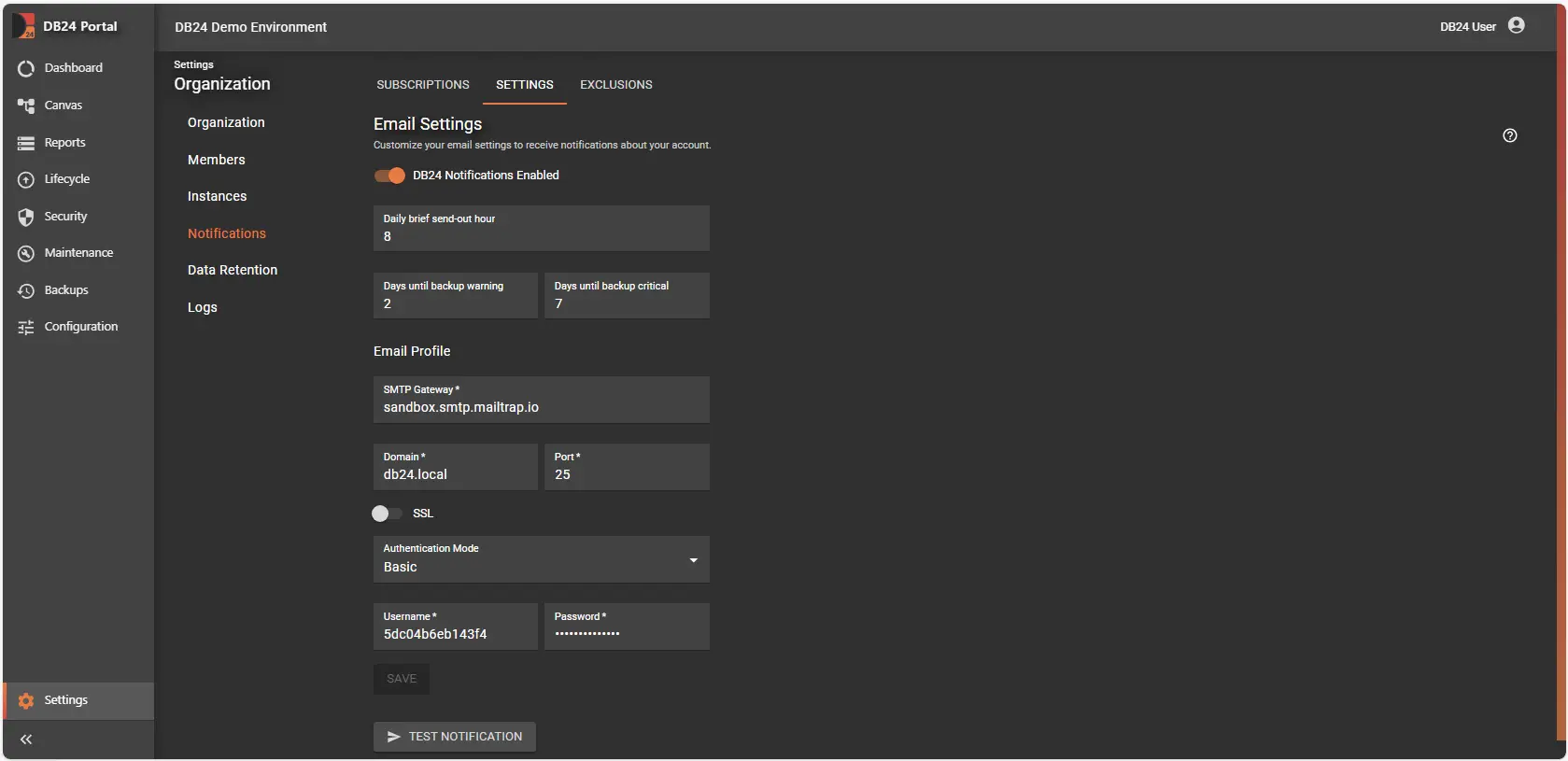
Email profiles are managed centrally within Organization settings in the DB24 Portal.
Settings
-
Enabled
Toggle to fully enable or disable DB24 Notifications. -
Gateway
SMTP server used for sending emails. -
Domain
Organization domain (e.g.db24.ai). -
Port
Port used for SMTP traffic. -
SSL
Enable or disable SSL encryption. -
Authentication Mode
Supported modes:- Anonymous
- Windows
- Basic (Username & Password)
-
Daily Mail Hour
Defines the hour (0–23) when daily notifications are sent.
Thresholds
-
Days Since Last Backup Warning
Number of days after which a missed backup generates a warning
(Default: 2 days) -
Days Since Last Backup Critical
Number of days after which a missed backup is marked as critical
(Default: 7 days)
Exclusions
Notification exclusions can be configured per notification event to reduce noise and prevent unnecessary alerts.
- Managed in the Portal under Organization settings
- Can be applied to specific instances or objects
- Helps users focus on meaningful and actionable notifications
Subscriptions
To receive notifications, subscription rules must be configured for each notification event.
- Users can disable notifications in their Portal profile
- Adding or re-enabling notifications requires administrator assistance
- Notifications can be sent to:
- Existing DB24 Portal users
- External email addresses
This flexibility supports a wide range of operational and organizational notification requirements.
Conclusion
DB24 Notifications are a critical component for monitoring and managing SQL Server environments. By configuring notification events, thresholds, exclusions, and subscriptions, organizations receive timely and relevant alerts that help maintain system health, security, and efficiency.
From daily insights to critical security and backup alerts, DB24 empowers teams to stay informed, respond quickly to issues, and keep their environments running smoothly.
For additional guidance, configuration help, or support, users can access resources directly through the DB24 Portal.
Related Documentation
- DB24 Overview - Platform introduction
- Portal Configuration - Web interface setup