
DB24 SQL Server Maintenance – Backups
Introduction
DB24 SQL Server Maintenance goes beyond standard database management tasks such as updating statistics, performing integrity checks, and rebuilding indexes. It includes comprehensive support for automated SQL Server backups within the DB24 Engine, eliminating the need for expensive third-party backup solutions.
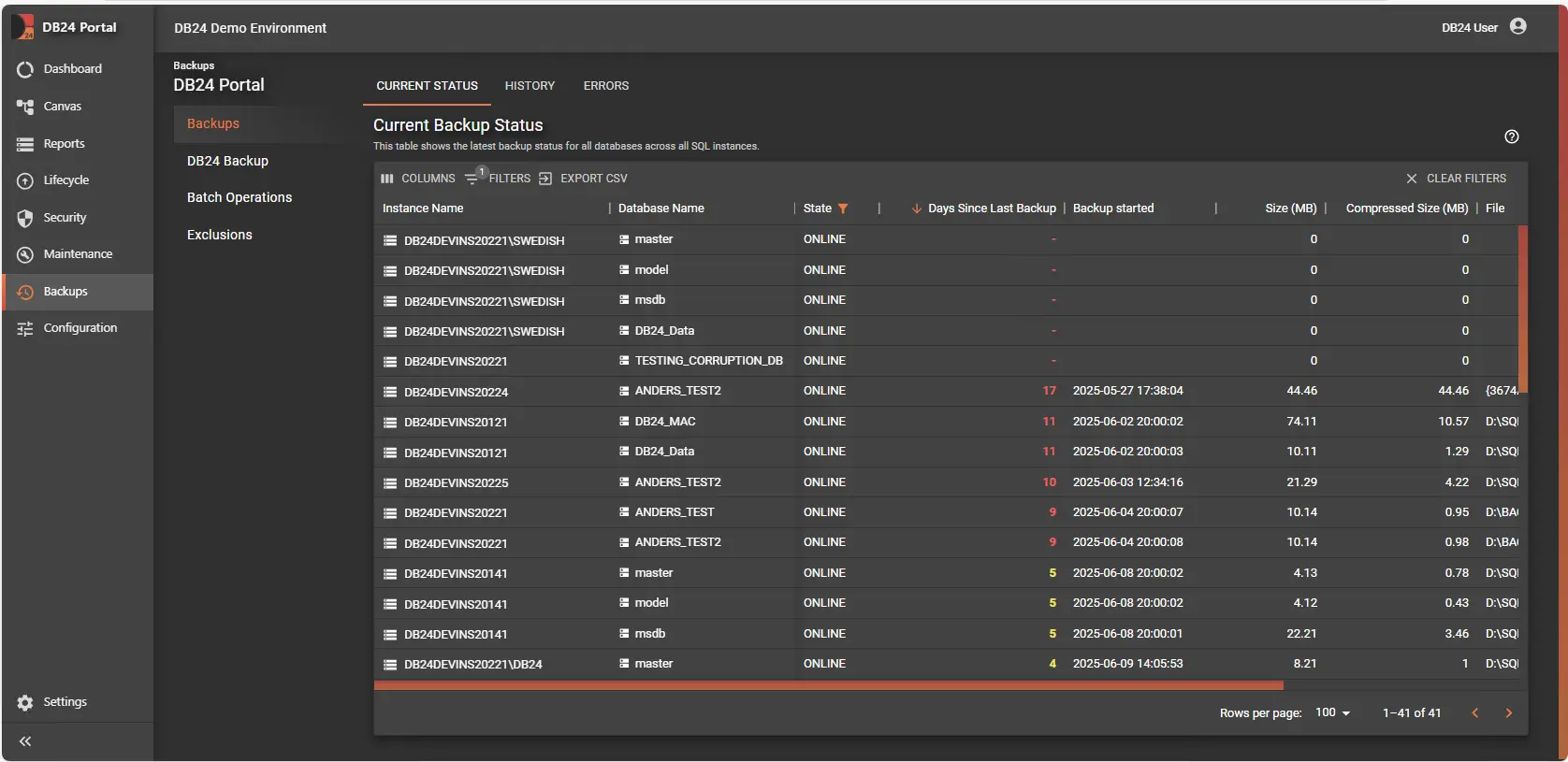
Backup Status
Key Features
-
1-Click Activation
Simply activate DB24 Backup. It is preconfigured using DB24 best-practice defaults, allowing experienced DBAs to fine-tune advanced options while enabling regular users to get started with minimal effort. -
Multiple Backup Attempts
DB24 automatically retries backups if the initial attempt fails, improving reliability. -
Backup State Monitoring
Even when using an external backup solution, DB24 collects and presents insights into your environment’s overall backup state.
DB24 Backup Configuration
DB24 manages SQL Server backups per instance. When enabled, DB24 schedules and executes:
- Full backups
- Differential backups (optional)
- Transaction Log backups
When DB24 Backups are disabled, existing backup files remain untouched. Only DB24-managed jobs are stopped.
Backup Types
-
Full
A complete copy of each database at the time of backup. Required to seed the transaction log backup chain. -
Differential (optional)
Captures all changes since the last successful Full backup. Useful for large databases to reduce backup size and duration between Full backups. -
Transaction Log
Captures ongoing changes, enabling point-in-time recovery.
Key Settings
-
Compression (On/Off)
Compresses backup files to reduce storage usage and potentially decrease backup duration. Consumes additional CPU during execution. -
Verification (On/Off)
After each backup, DB24 runsRESTORE VERIFYONLYto validate backup integrity. No data is restored. -
Auto Full Backups (On/Off)
If DB24 detects no usable Full backup for log chaining, it automatically performs a Full backup before running Log backups. -
Backup File Path
Allows overriding the default backup path.
DB24 never creates the root directory; it must exist and have correct permissions for the SQL Server service account.
Scheduling
-
Full Backup Start Time (HH:mm)
Daily time when DB24 attempts Full backups, governed by the Full backup bitmask. -
Log Backup Interval (minutes)
Frequency of Log backups (for example, every 15 minutes) for databases inFULLorBULK_LOGGEDrecovery. -
Differential Backup Start Time (HH:mm)
Daily time when DB24 attempts Differential backups when enabled. -
Full Backup Bitmask (for Diff mode)
Select which weekdays run Full backups instead of Differential backups.
Differential Strategy (Optional)
- Minimum Database Size for Differential (MB)
Databases smaller than this threshold will not take Differential backups and will instead use Full + Log backups only.
Larger databases follow the Differential schedule for improved efficiency.
Striped Backups (Multi-File)
For large databases, DB24 can split a single backup into multiple files (stripes) to improve throughput:
-
Two Files Threshold (GB)
Uses 2 stripes when estimated backup size exceeds this threshold. -
Four Files Threshold (GB)
Uses 4 stripes above this size. -
Six Files Threshold (GB)
Uses 6 stripes above this size.
Notes:
- All stripes are created in the same target directory.
- All stripes follow the same retention rules.
- Restore operations automatically detect and use all stripes.
Good to Know
- Leaving Backup File Path empty uses the SQL Server default path.
- Cleanup never deletes backups until a newer successful backup of the same type exists.
- Cleanup never removes files that are part of the latest backup chain.
- Databases in
SIMPLErecovery still receive Full (and optional Differential) backups, but Log backups are skipped by design. - Strategies can be mixed per instance; DB24 applies them to all databases unless exclusions are configured.
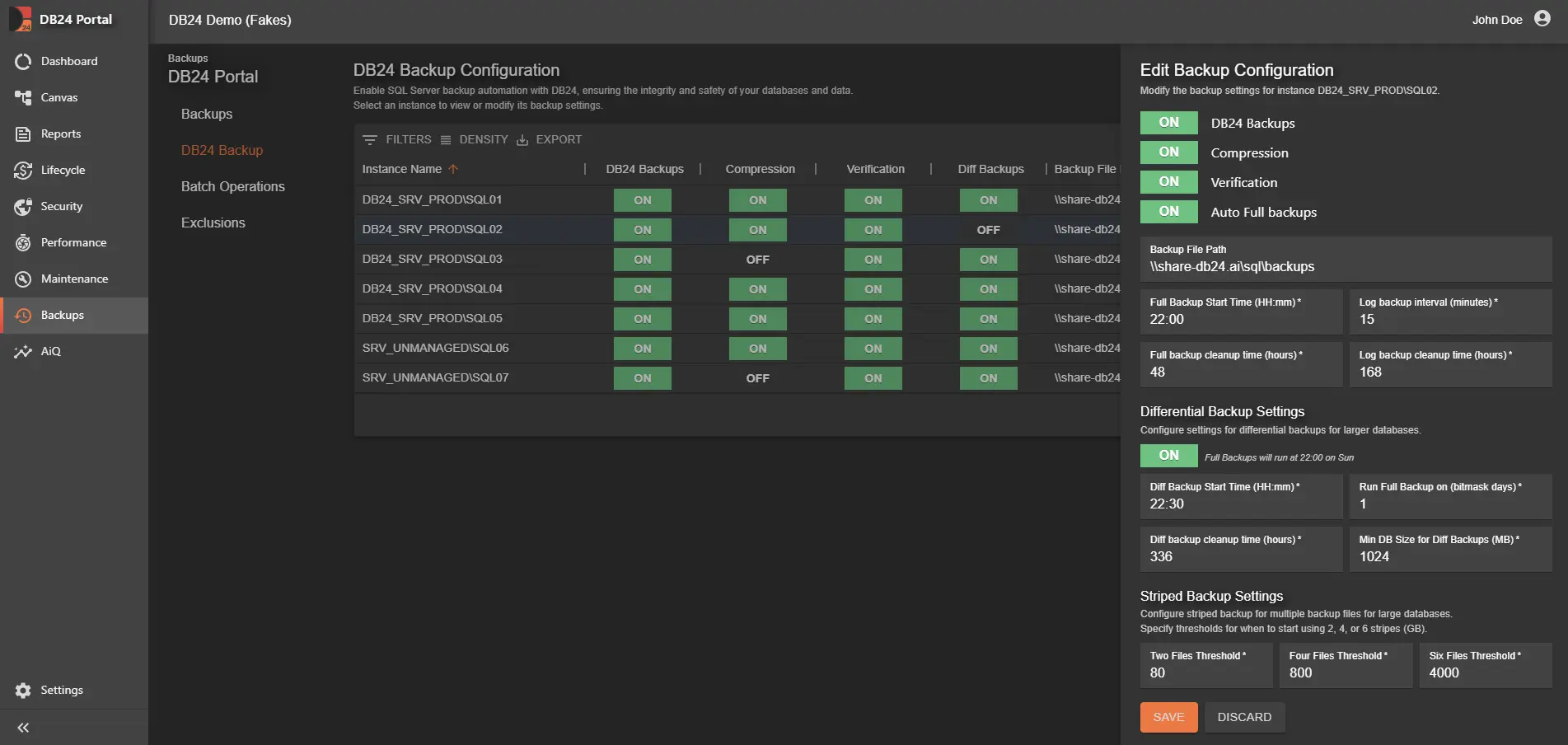
Backup Matrix
Backup Matrix 2025.5
Exclusions
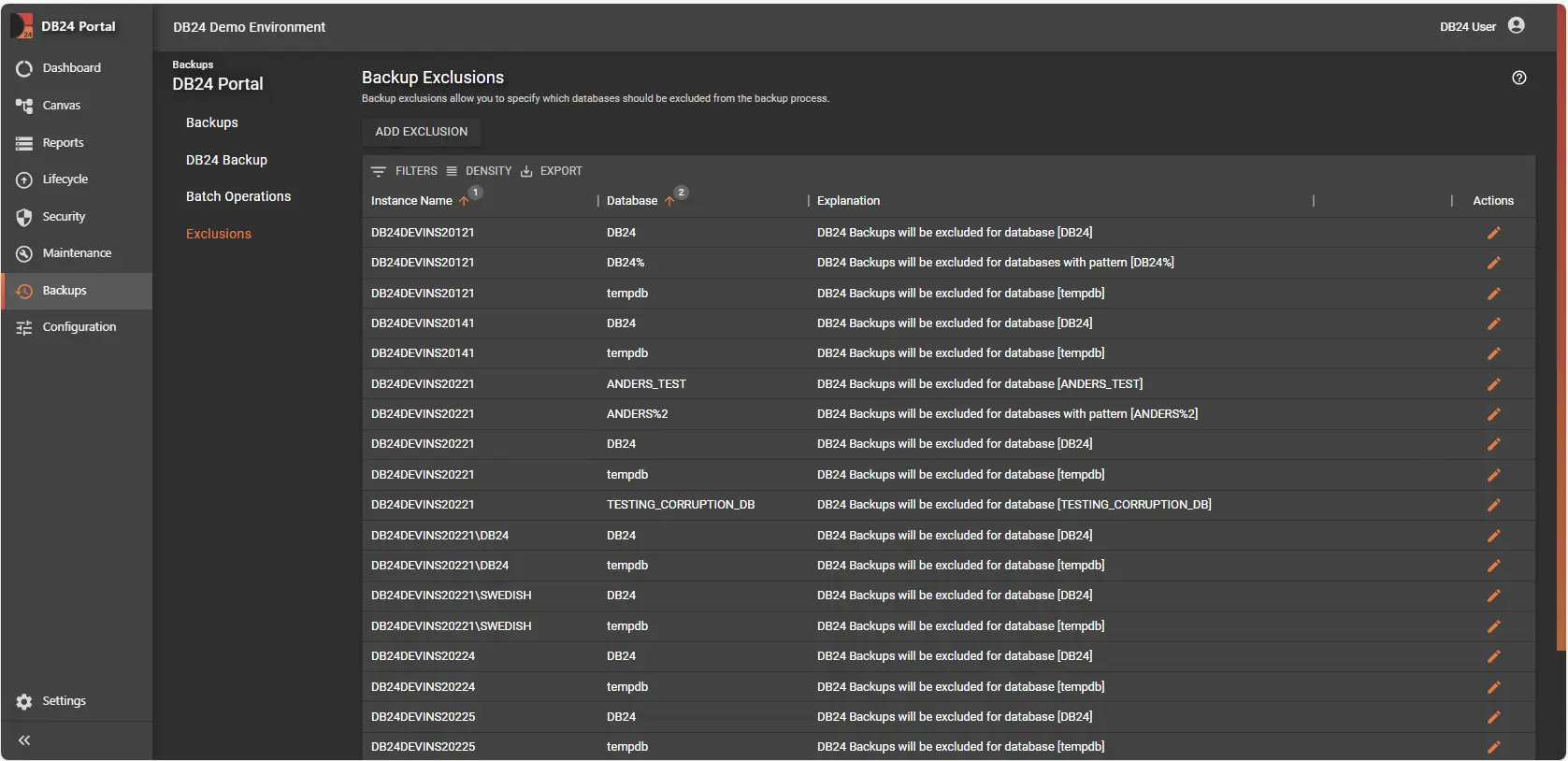
Backup Exclusions
Backup Exclusions allow you to define databases that should not be included in DB24 backup operations. This is useful for optimizing backup duration and storage by excluding temporary or less critical databases.
Service Account Permissions
The SQL Server service account must have appropriate permissions on the designated backup folders:
- Read & Write, or
- Full Control
Backup Notifications
Stay informed about backup health by subscribing to the Backup Warning event.
You will receive alerts for:
- Failed backups
- Databases with backups older than configured thresholds
- Backup size deviation warnings
- Backups flagged as
IsDamaged - Path mismatches when DB24 Backup is enabled but the actual backup path differs from the configured path
- Applies only when the backup is not
COPY_ONLYand not a snapshot
- Applies only when the backup is not
Related Documentation
- DB24 Overview - Platform introduction
- Notifications - Alert configuration