
Change Tracking
Overview
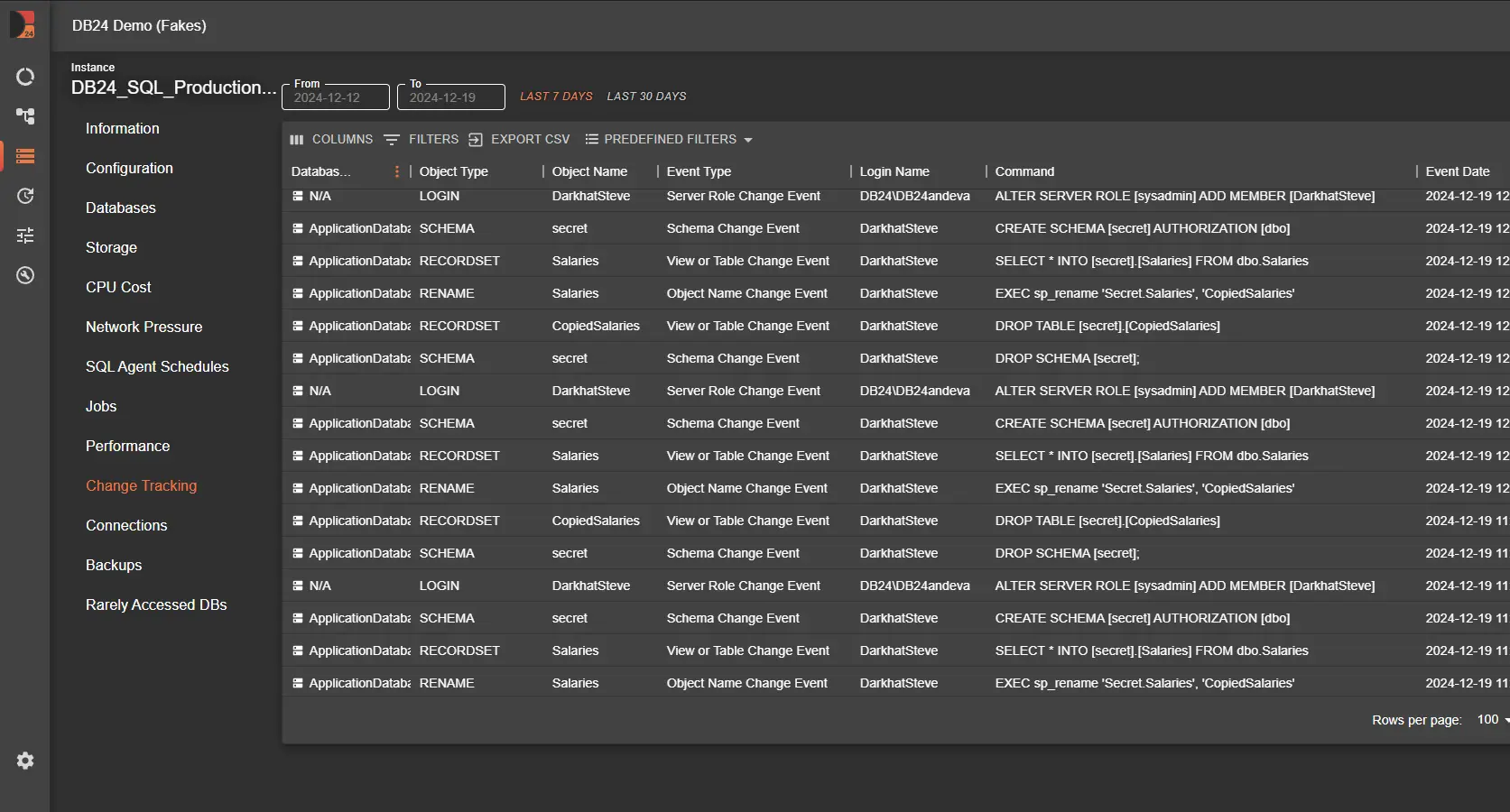
Change Tracking in DB24 ensures that critical events in your SQL Server environment are logged and monitored in real time. This capability is powered by DDL Triggers, which capture and record changes to databases, logins, schemas, roles, tables, views, and stored procedures.
The collected data helps organizations identify potential issues, detect unauthorized changes, and maintain a secure, reliable, and auditable database environment.
How Change Tracking Works
DB24 uses a set of DDL Triggers that monitor specific events across each SQL Server instance.
When a tracked event occurs, the trigger logs the change to the:
Each record includes essential details such as:
- Event type
- Affected object
- Timestamp
- Login name
- Executed command
This data is then collected and sent to the centralized Datastore, where it becomes available for reporting, analysis, and auditing.
Triggers and Their Purpose
1. DB24Tracker_Database_Change
-
Monitored Events:
CREATE_DATABASE,ALTER_DATABASE,DROP_DATABASE -
Purpose:
Captures all database-level changes, including creation, modification, and deletion. -
Importance:
Ensures full visibility into database lifecycle changes and helps maintain control over the environment.
2. DB24Tracker_Login_Change
-
Monitored Events:
CREATE_LOGIN,ALTER_LOGIN,DROP_LOGIN -
Purpose:
Tracks changes to SQL Server logins. -
Importance:
Helps identify and respond to unauthorized or suspicious login activity.
3. DB24Tracker_Role_Change
-
Monitored Events:
ADD_SERVER_ROLE_MEMBER,DROP_SERVER_ROLE_MEMBER -
Purpose:
Logs changes to server role memberships. -
Importance:
Critical for auditing and detecting unauthorized privilege escalations.
4. DB24Tracker_Proc_Change
-
Monitored Events:
CREATE_PROCEDURE,ALTER_PROCEDURE,DROP_PROCEDURE -
Purpose:
Records changes to stored procedures. -
Importance:
Maintains transparency in procedural changes, supporting debugging and compliance efforts.
5. DB24Tracker_ViewTable_Change
-
Monitored Events:
CREATE_TABLE,ALTER_TABLE,DROP_TABLE
CREATE_VIEW,ALTER_VIEW,DROP_VIEW -
Purpose:
Tracks structural changes to tables and views. -
Importance:
Ensures consistency and visibility into database object definitions.
6. DB24Tracker_Schema_Change
-
Monitored Events:
CREATE_SCHEMA,ALTER_SCHEMA,DROP_SCHEMA -
Purpose:
Monitors schema-level changes. -
Importance:
Provides insight into schema modifications, supporting governance and troubleshooting.
7. DB24Tracker_Rename_Change
-
Monitored Events:
RENAME -
Purpose:
Captures object renaming operations. -
Importance:
Ensures traceability of renamed objects and prevents confusion during audits and investigations.
Predefined Filters for Enhanced Analysis
The Change Tracking report includes predefined filters to help focus analysis on specific event categories.
Example:
- Server Role Changes
- Identify unauthorized role assignments or privilege escalations
- Quickly detect actions that may indicate suspicious or non-compliant activity
These filters allow security teams and DBAs to efficiently analyze large volumes of change data.
Benefits of Change Tracking
-
Proactive Security
Detect and respond to unauthorized or risky changes before they escalate. -
Audit Trail
Maintain a complete and trustworthy record of all significant database changes. -
Compliance Support
Meet regulatory and governance requirements through full traceability of modifications. -
Streamlined Troubleshooting
Identify root causes of issues by reviewing logged events and executed commands.
Related Documentation
- DB24 Overview - Platform introduction