
Prerequisites for Installation
Before starting the installation, ensure that the following prerequisites are met for both the Datastore and Runtime environments.
DB24 Environment Readiness Wizard
DB24 provides a lightweight Environment Readiness Wizard to validate that your SQL Server environment is prepared for a successful DB24 installation.
This validation tool checks key aspects of your system, including:
- Configuration
- Network connectivity
- Required permissions
Find download link for the Readiness Wizard under Installation Guide.
DB24 Prerequisites
✅ Installation Media
Ensure that the DB24 installation media is available and executable on the web server.
✅ Network Connectivity
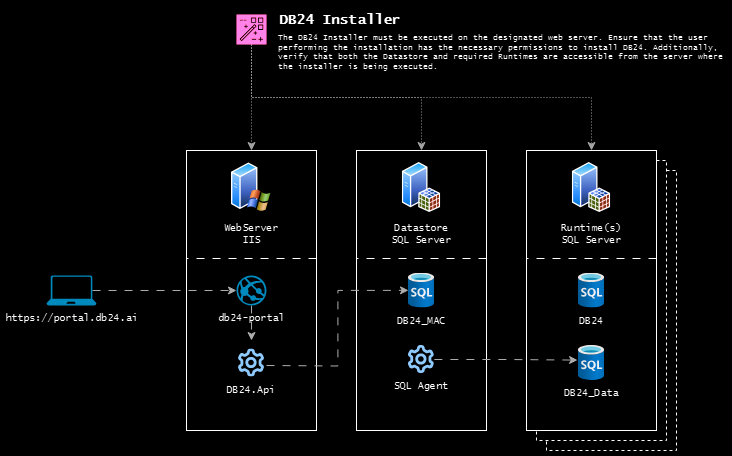
DB24 requires network connectivity between components during two different phases: Installation/Upgrade and Normal Operation.
Operational Network Requirements
During normal operation, the following connectivity must be available:
-
Web Server → Datastore SQL Server (default port: 1433)
The DB24 API running on the web server must be able to connect to the Datastore SQL Server instance hosting the DB24_MAC database. -
Datastore SQL Server → Runtime SQL Server Instances (default port: 1433)
The Datastore must be able to connect to each Runtime SQL Server instance from which DB24 collects monitoring and operational data.
Installation and Upgrade Network Requirements
During installation or upgrades, additional connectivity is temporarily required.
The web server where the DB24 installer is executed must be able to connect to:
- The Datastore SQL Server instance
- All Runtime SQL Server instances where DB24 components will be installed
This access is required because the installer deploys DB24 components directly to the target SQL Server instances. After installation or upgrades are completed, this connectivity is no longer required for normal DB24 operation.
✅ Hardware Requirements
The following hardware recommendations apply to the DB24 Web Server and the Datastore SQL Server hosting the DB24_MAC database.
These recommendations are suitable for typical environments with a moderate number of monitored SQL Server instances. Larger environments may require additional resources.
Recommended Specifications
- DB24 Web Server:
4 vCPU16 GB RAMHosts the DB24 Portal, API, and background services - Datastore SQL Server:
4 vCPU16 GB RAMHosts the DB24_MAC database used for centralized data storage
✅ SQL Server Version
- SQL Server 2012 or later is required.
✅ TCP/IP Protocol
- Ensure that TCP/IP is enabled on the Datastore SQL Server instance.
✅ Authentication Mode
- Mixed-mode authentication must be enabled on the Datastore SQL Server instance.
✅ SQL Service Account
- Use a domain-based service account (Active Directory) for the Datastore SQL Server Agent.
Account format requirements:
- ✔️ Supported:
domainName\loginName(NetBIOS format) - ❌ Not supported:
loginName@domainName(UPN format)
✅ SQL Server Agent
- Ensure that SQL Server Agent is enabled and running on all targeted SQL Server instances.
✅ Installation User Permissions
- The account used for installation must have sysadmin privileges on all SQL Server instances.
Note:
These privileges are required only during installation.
DB24 does not require sysadmin privileges during normal operation.
Suggested Environment Setup
DB24 Datastore can be installed on an existing SQL Server instance. However, for large or mission-critical environments, a dedicated SQL Server instance is recommended.
That said, DB24 also works reliably when installed alongside an existing SQL Server instance. This approach can be a cost-effective alternative by avoiding the need for an additional licensed SQL Server, especially in smaller environments.
The product works equally well when installed alongside an existing SQL Instance. This approach can also be a viable option to save on licensing costs by avoiding the need for a separate isolated SQL Server instance.
Related Documentation
- Installation Guide - Setup instructions